Skip to content
Createby HaveSight

Our work

The public experience, and the systems running behind it.

Live client platforms first, described in capability terms — public experience, business system, CRM and workflow, portal, admin and operations, integration. Then concept demonstrations of the parts that normally sit behind a login.

Selected live builds

Real platforms, running in real businesses.

Each of these was scoped to what the business actually needed. Some are full operating platforms — how customers buy and sign in, how estimates and projects are run, how content and campaigns stay current, how the owner sees where things stand. One is a beautifully executed public website, because that is what the client needed. The range is the point.

risingtideplumbing.com
Live build
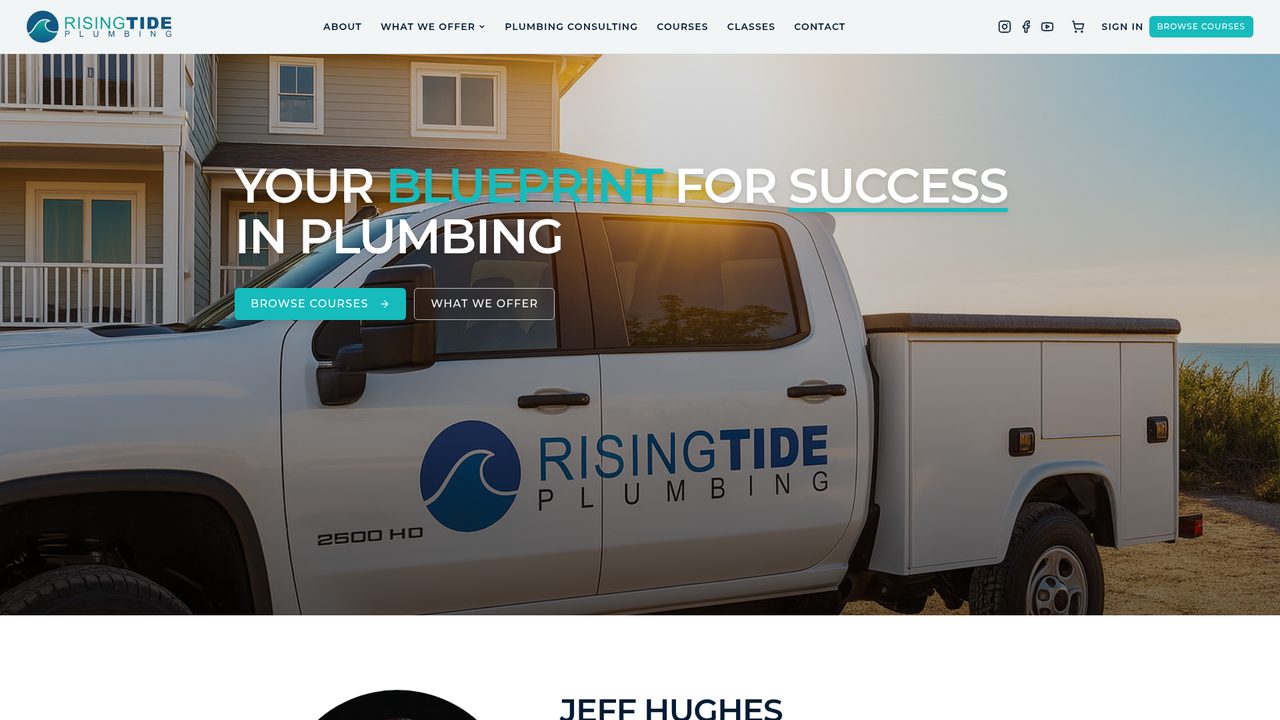
Rising Tide Plumbing homepage: full-width hero photograph of a service truck at sunrise with course and services calls to action.
Learning platformSecure accountsCommerce & paid accessB2B licensingCustomer managementOwner operations

One connected platform

  1. Public experience
  2. Customer & business accounts
  3. Commerce
  4. Learning & training
  5. Customer management
  6. Owner operations
Live buildConnected digital business platform

Rising Tide Plumbing

What we built
Not a course website — a connected digital business platform. The public brand experience is one layer of a system that also carries commerce, secure learner accounts, individual classes and full courses, bundled programs, business licensing for companies training their teams, content administration, customer management and the owner's operational and financial visibility.
What it does
  • Turns expertise into sellable programs: individual classes, full courses and bundled programs, each with its own path to purchase and access.
  • Gives every learner a secure account with paid access, video progress that picks up where they left off, and program-only training content.
  • Supports business customers directly: companies buy licensed access, assign seats to their people, and their learners complete quizzes with passing requirements to prove competency.
  • Keeps the catalog, video library, class and course content and pricing under the owner's control, with new material published without a developer.
  • Handles the money and the follow-through: checkout and paid access, purchase records, license expirations and the automated notices that go with them.
  • Keeps customer and company relationships in one place, with transactional email delivery, unsubscribe and suppression handling built in.
What you can see
The public brand experience, program navigation, class and course listings, and the sign-in and purchase entry points.
Behind the build
An owner workspace covering the video library, classes, courses, bundles, quizzes, business accounts, purchases, finance and customer records — plus the automated workflows around access, licensing and renewals. It is the operating system of the business, not just its storefront. It is also built to grow: additional customer communication and marketing capability is planned as the business expands.
Visit risingtideplumbing.com

kitchencreationsnc.com
Live build
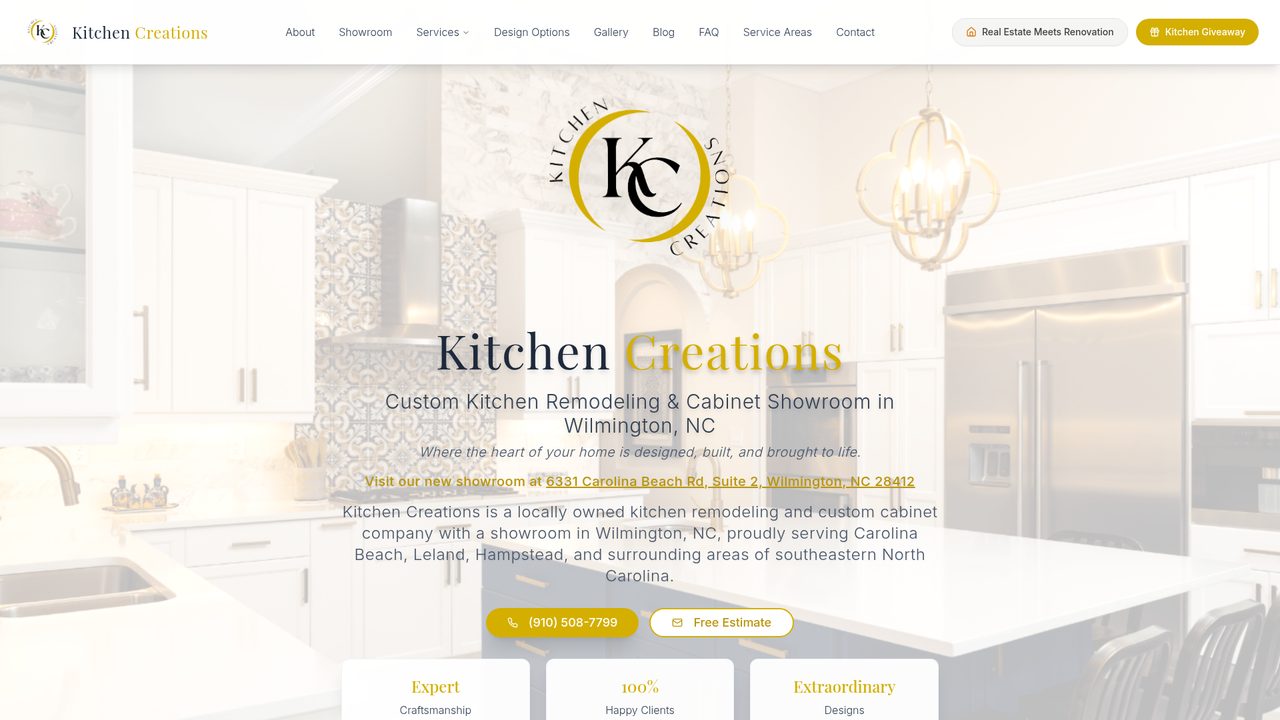
Kitchen Creations homepage: warm kitchen photography behind the brand mark, with showroom address, phone and free estimate actions.
Estimating & pricingProject deliveryJob costing & P&LCustomer managementTeam workflowAI assistance

One connected platform

  1. Public experience
  2. Lead & consultation intake
  3. CRM
  4. Estimating & pricing
  5. Project delivery
  6. Job costing & profitability
  7. Team operations
Live buildRemodeling operating system & public experience

Kitchen Creations

What we built
A design-led public experience for a Wilmington kitchen remodeling company and showroom — and, behind it, a private operating system for the way the company actually sells and delivers work: leads, estimates, pricing, projects, materials, workflow, profitability and team coordination in one place.
What it does
  • Guides homeowners from inspiration to a consultation request, with the showroom, design options and galleries carrying the sales conversation.
  • Turns inquiries into working records: website consultation requests, giveaway entrants and event signups land in one customer list with filtering, export and email blasts, and a consultation inbox that converts a request into a client and a project.
  • Builds estimates properly: multi-category line items with quantities, costs, markups, review flags and tax, a status workflow, reusable cabinet and dealer price lists, a pricing catalog, supplier-quote import, margin and compensation settings, saved estimates and client-ready documents.
  • Uses AI where it saves the estimator time — assisted estimate generation and smart margin adjustment — with the numbers always reviewed by a person before they go out.
  • Runs each job in its own workspace: overview and workflow, pending items, messages, internal notes, materials and selections with vendors, models, approvals and attachments, plus a client-facing materials checklist.
  • Keeps the money honest: purchase orders that roll real costs into job costing, project profit and loss with margin, compensation and net profit visibility, deposit and draw schedules, change orders and estimate versions.
  • Coordinates the team on a stage-by-stage delivery board with assignments, due dates, statuses and attachments that update a project's phase and next action automatically — alongside a shared calendar, giveaway and campaign management, user roles and private document storage.
What you can see
The public brand and showroom experience, design and gallery content, service-area pages, campaign and giveaway entry points, and the consultation request path.
Behind the build
The estimating, pricing, project delivery, materials, job costing and profitability workspace the company runs on day to day, plus the customer list, team workflow board and campaign tools. A client-facing project portal is planned rather than live.

Visit kitchencreationsnc.com

prismmaritime.com
Live build
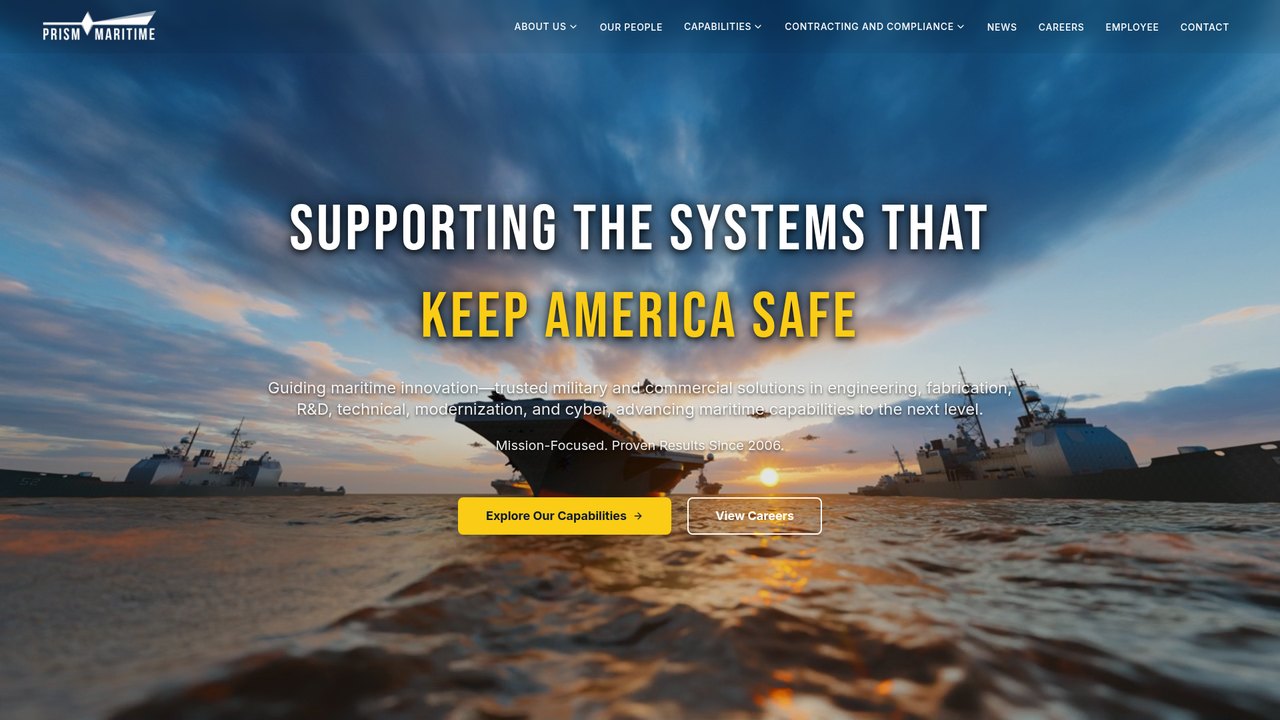
Prism Maritime homepage: naval imagery behind the headline “Supporting the Systems that Keep America Safe,” with capability and careers actions.
Capability architectureCustomer managementCampaigns & eventsPublishing & documentsCareers & recruitingRole-based administration

One connected platform

  1. Public experience
  2. Lead & event intake
  3. CRM
  4. Publishing & documents
  5. Campaigns & communications
  6. Recruiting & admin operations
Live buildDefense & maritime platform with secure operations environment

Prism Maritime

What we built
A credibility-first public platform for a maritime and defense engineering firm serving the U.S. Navy, DoD and federal agencies — connected to a secure environment for communications, recruiting, publishing, customer relationships, events and content operations.
What it does
  • Presents four core capability areas — modernization and ship repair, technical services, fabrication and machining, and IT, cybersecurity and AI — with the depth a government or prime-contractor evaluator expects, alongside contracting and compliance information built for procurement review.
  • Captures interest through several purpose-built paths: general contact, a readiness assessment, trade-show and QR code lead capture, support intake and event RSVPs — all feeding one place.
  • Keeps relationships organized: contacts with sources, statuses, notes and activity history, new-lead visibility, bulk actions, import and export, and reporting on where inquiries come from.
  • Runs outbound communication in house — templates and distribution lists, scheduled sends, open and click tracking, unsubscribe handling, campaign reporting and configurable notification routing — plus event RSVP, capacity and reminder workflows.
  • Publishes news and insight without a developer: drafts and scheduled publishing, tagging, related and featured posts, media handling, editorial preview, and AI-assisted article drafting that a person reviews before anything goes live.
  • Maintains contracting, partner and supplier content and a document library with stable links, so a document can be replaced without breaking a published URL.
  • Supports hiring directly: careers stay in step with the company's applicant tracking system so openings update automatically and applicants hand off cleanly, with employee and internal resource entry points alongside the public site.
  • Controls access properly: role-based administration with module-level permissions and teammate invitations, plus the automated notifications, reminders and delivery workflows running behind it.
What you can see
The public capability, contracting and compliance, news and careers experience, the several inquiry and event paths, and the contact and employee entry points.
Behind the build
A permissioned operations environment covering customer relationships, campaigns and events, editorial publishing, the document library, recruiting handoff and administration — the working side of the organization's communications and content, kept private by design.

Visit prismmaritime.com

The depth you can’t screenshot

What you see publicly is only part of what we build.

What you can see here is the public half of the work. Many Create projects also include private applications, administrative systems, workflows, integrations, CRM functionality, automation and AI capabilities that belong to our clients and stay behind the login. So the portfolio shows the parts we're able to share — the depth usually sits underneath.

  • Client and customer portals
  • CRM and customer management
  • Learning and training systems
  • Commerce, payments and paid access
  • Quoting, estimating and intake
  • Administrative dashboards
  • Automated business workflows
  • AI tools, reporting and integrations

A beautifully designed website is still one of the most valuable things we build — it is simply strongest when it is the public face of a system that also does the work. Client systems stay private by default, and we share identifiable work only with explicit permission — which is the reason the next section exists.

Concept demonstrations

Ideas, explored.

Client applications sit behind a login, so these show the kinds of systems that live behind or alongside a public experience — without exposing a private client environment. Each one explores a real business problem: a pipeline that lives in three inboxes, a program nobody knows how to enter, a weekly status report assembled by hand.

Every example below is fictional

These are fictional demonstrations created to show the kinds of systems we can design. They contain no client data, screenshots, proprietary workflows or claimed outcomes.

Cedar & VineConnected website & customer experience
Concept
Cedar & VineRequest a visit

Sample service company

Careful work, clearly scheduled.

Start an inquiryBook a consultation
Service A
Service B
Service C

Guided service inquiry — step 2 of 3

Service type: Sample option
Timing: Within 30 days
Preferred window: Weekday morning
Continue to review

Connected handoff

  1. Website inquiry submittedSource: guided form
  2. Record created in CRMSample Contact · new
  3. Consultation slot heldConcept booking step
  4. Owner reviews before replyPerson decidesReviewer: owner

Connections

  • CRM
  • Calendar
  • Email
  • Forms

Fictional company, content and options

Concept DemonstrationConnected websites

Cedar & VineConnected website and customer experience

The business problem
Professional and service businesses, trades, studios, clinics, membership organizations — anywhere the public site should be the front door to the operation rather than a brochure standing on its own.
What it demonstrates
A polished public site for a fictional service company, a guided service inquiry, a consultation booking step, and the handoff where an inquiry becomes a real record in the CRM — with a person reviewing before anything is sent back.
Design principle
A website earns its keep when what happens after the form is as designed as the page itself.
Relevant connections
  • CRM
  • Calendar / booking
  • Email
  • Forms and guided journeys
Northstar CRMContact record & pipeline
Concept

New

7

Qualified

5

Proposal

4

Won

3

Contact record

Contact

Sample Contact

Company

Sample Company LLC

Stage

Proposal — sample

Owner

Team member A

Open tasks

  • Send scope summary
  • Confirm site visit window
  • Check estimate assumptions

Communication timeline

  1. Day 1Inquiry received from website
  2. Day 1Acknowledgement sent
  3. Day 3Call logged — notes attached
  4. Day 6Follow-up drafted automatically

Follow-up automation

Approval required

Draft prepared for day-6 follow-up. Held until a person approves it.

Invented names, stages and sample counts

Concept DemonstrationBusiness platforms

Northstar CRMCustom CRM and communications workspace

The business problem
Owner-led sales, estimating-driven work, referral businesses, or teams whose pipeline currently lives in a spreadsheet and three inboxes.
What it demonstrates
Contact and company records, a pipeline view, open tasks, a communication timeline, and follow-up automation that prepares a draft but holds it for human approval.
Design principle
Automate the preparation and the remembering. Keep the judgment and the relationship with a person.
Relevant connections
  • Website intake
  • Email and SMS
  • Calendar
  • Reporting
GuidePathLearning & membership portal
Concept

Course progress

2 of 4modules complete
  • Module 1 — OrientationComplete
  • Module 2 — Core PracticesComplete
  • Module 3 — Working SessionsIn progress
  • Module 4 — Review & HandoverNot started

Cohort / membership view

  • Learner AActive member
  • Learner BActive member
  • Learner CInvited

Next action

Finish the “Working Sessions” worksheet, then book your review slot.

Resource library

  • Sample Workbook (PDF)
  • Session Recording — Part 1
  • Reference Checklist
  • Glossary of Terms

Learner status

Enrolled

12

Active

9

Awaiting start

3

Fictional program content and sample learner counts

Concept DemonstrationLearning & membership

GuidePathLearning management and membership portal

The business problem
Training programs, professional education, membership communities, client onboarding, or a handover process that repeats with every new engagement.
What it demonstrates
Courses and modules with progress, a resource library, learner status, a cohort or membership view, and one clear next action instead of a wall of content.
Design principle
One obvious next step beats a complete library nobody knows how to enter.
Relevant connections
  • Member accounts
  • Content and resource management
  • Payments where a program is paid
  • Progress reporting
MarketLaneStore, payment & fulfillment concept
Concept

Catalog

Sample Item 1One-time
Sample Item 2One-time
Sample PlanSubscription

Cart / order state

Sample Item 1Qty 2Reserved
Sample PlanMonthlyPending payment

Customer account

Customer

Sample Customer

Plan

Sample monthly plan

Order history

3 sample orders

Saved details

Managed by processor

Payment integration

StripeOne-time or subscription — conceptual
  • Checkout hosted by the processor
  • Payment confirmation received
  • Refund or change requires reviewPerson decides

Downstream fulfillment

  1. Order confirmedSample order #1042
  2. Fulfillment task createdQueue: Team B
  3. Customer notifiedTemplate: order update
  4. Recorded for reportingOperational summary

Payment features shown are conceptual. Stripe availability and implementation depend on project requirements and an approved account set up in the client's own name. Create does not process or store card data.

Concept DemonstrationCommerce & payments

MarketLaneStore, payment and fulfillment concept

The business problem
Product and service catalogs, paid programs and memberships, deposits and recurring plans, or an online order path that currently ends in a manual email.
What it demonstrates
A product catalog, cart and order state, a customer account, one-time and subscription options with Stripe shown as the payment integration, and the fulfillment workflow that follows a confirmed order.
Design principle
Checkout is the middle of the story, not the end — design the work that follows it.
Relevant connections
  • Stripe (subject to project requirements and account setup)
  • Customer accounts
  • Fulfillment workflow
  • Operational reporting
WorklineInternal operations & financial visibility
Concept

Intake

6

Scheduled

11

In progress

8

Awaiting sign-off

3

Workload by team

  • Team A
  • Team B
  • Team C

Invented sample trend

Project profitability — sample data

ProjectBudgetActualVar.
Project 10424,00022,400+1,600
Project 11816,50017,300-800
Project 12631,00028,900+2,100

Fictional sample figures for illustration — operational visibility only, not an accounting system

AI-assisted exception summary

Human review

Three sample jobs are stalled: two waiting on confirmations, one without an owner. Summary prepared for review — no action taken automatically.

Needs attention

  • Job 2041Waiting on parts confirmation
  • Job 2058No owner assigned
  • Job 2063Sign-off pending 3 days

Recurring reports

  • Monday operations summaryWeekly
  • Budget vs actual reviewMonthly
  • Open exceptions digestDaily
Concept DemonstrationAI & operations

WorklineInternal AI operations and financial visibility

The business problem
Owner-led service companies, field operations, scheduling-heavy businesses, or leadership teams assembling status and project position by hand each week.
What it demonstrates
Work stages and workload at a glance, an AI-assisted exception summary presented for human review, project budget-versus-actual visibility, and recurring reports on a set cadence. All figures are fictional sample data.
Design principle
Show the exceptions first; a healthy pipeline should be quiet.
Relevant connections
  • Project and scheduling data
  • CRM
  • Operational financial tracking
  • Recurring reports and digests